
Filter usage
When you save the filter, it will be added to the filter list. From here, you can see all the necessary info about the filter itself, including the filter’s name, scope and the number of affected items.
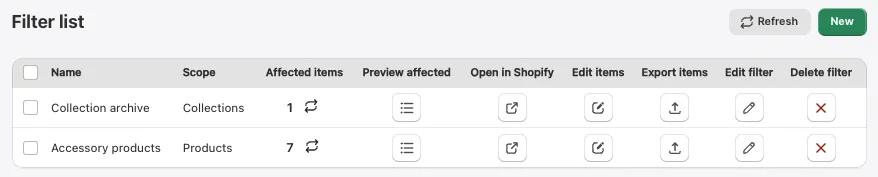
From here, you can see all the uses of filters:
- Preview affected: This allows you to see the affected items and open each one in Shopify’s editor.
- Open in Shopify: This opens all your products that were selected by the filter in Shopify’s search, enabling you to easily bulk edit them, export their product data, add tags, add them to a collection and much more.
- Edit items: This opens the selected items in the ACF bulk editor so you can easily edit their metafield data.
- Export Items: Exports affected items in a CSV format.
- Edit filter: Takes you back to the editor and enables you to change query parameters as desired.
- Delete filter: Completely removes the selected filter.
Ultimately, all exported data will be accessible in CSV format, ready for use according to your specific requirements.
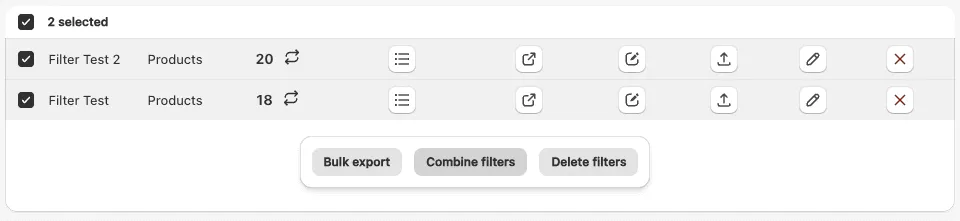
You can also combine multiple filters of the same scope together into a single filter. By default, it will select all items affected by one OR the other filter, but that behavior can be easily tweaked in the filter editor.
Quick filters
Section titled “Quick filters”If you’d rather not build a query from scratch, the Quick filters dropdown at the top of the filter list gives you a set of ready-made filter templates for the most common use cases.
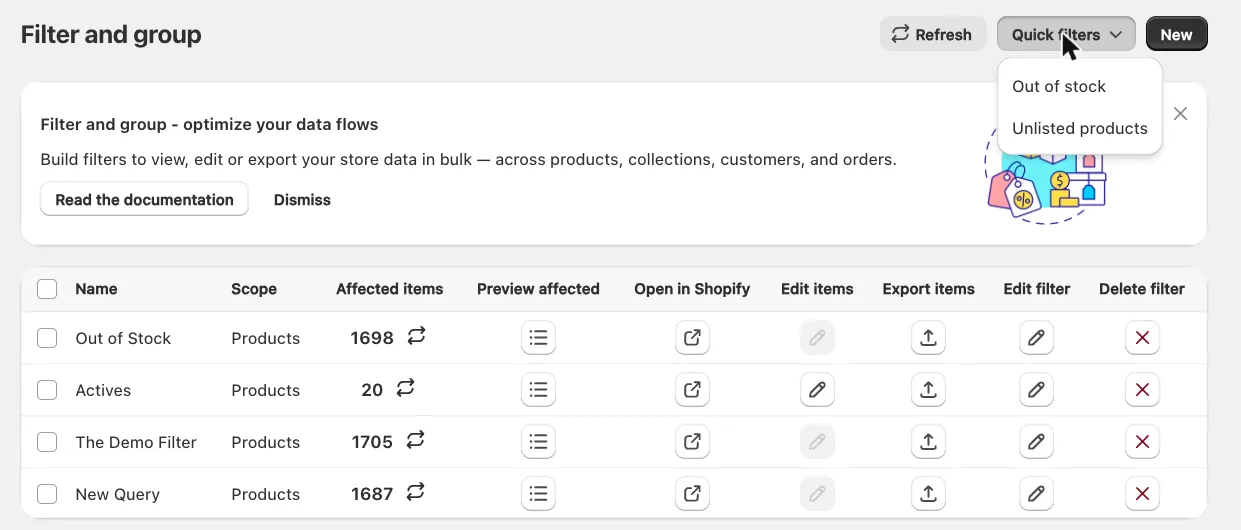
Currently available quick filters:
- Out of stock: selects all products whose
Inventoryis less than or equal to0. - Unlisted products: selects all products whose
StatusequalsUNLISTED.
Selecting one of them opens the Query Builder with the template already applied - the scope, filter name and query conditions are pre-populated for you. Nothing is saved at this point, so you can rename the filter, add or remove conditions and preview the affected items just like with any other filter. Click Save to add it to your filter list, or Discard if you no longer need it.