
Change field name and type
This article serves to communicate the risks involved in changing a field’s name, namespace and/or data type. It’s important to note that ACF won’t stop you from carrying out the changes, since the rationale for doing it can vary greatly.
Normally, ACF will show these field properties as read-only for already created fields, but it’s possible to edit these fields by clicking the small “lock” icon in the lower-left corner of the dialog:
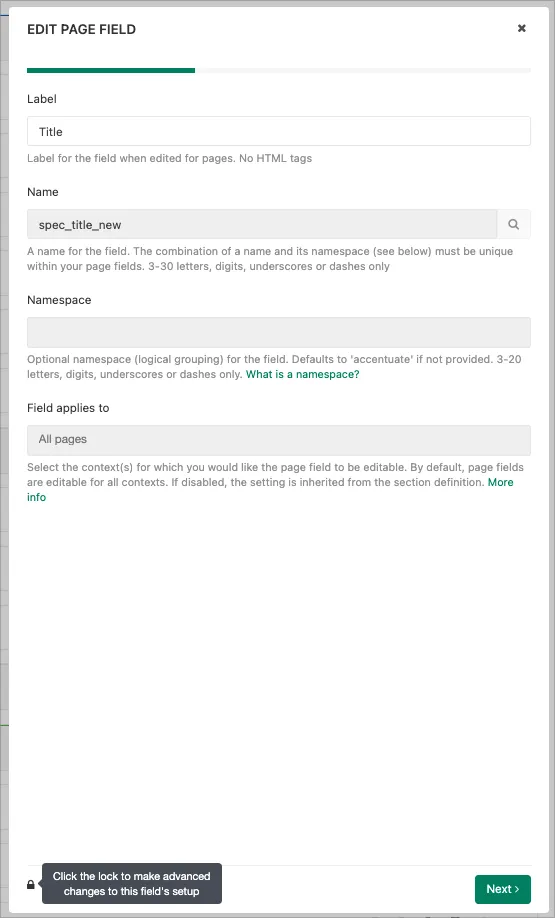
The reason behind making this just a tiny bit difficult is that changing an existing field’s definition of name and/or namespace may cause loss of access to any already defined values for that particular scope that use the current name and namespace combination.
Or, maybe worse, you may point your new name/namespace combination to some already defined fields (by other apps, maybe) with incompatible values.
A change of a field’s type is always possible when there are no existing values tied to the definition (no values entered for a product, a page, etc).
However, when existing values are already in place, care must be taken before carrying out a change. Please see the below table for how field types can be changed.
Also note that while something is possible from a technical standpoint, it doesn’t mean it’s a good idea. But ultimately, this is for you to decide.
Field type change overview
Section titled “Field type change overview”Text - can be changed to any of the following:
- HTML
- Checkbox
- Selection
- Tags
- Number
- Color
- Multi-language Text
- Multi-language HTML
Markdown - can be changed to:
- JSON
Checkbox - can be changed to any of the following:
- Text
- HTML
- Selection
- Tags
Selection - can be changed to any of the following:
- Text
- HTML
- Markdown
- Tags
- Number
Tags - can be changed to any of the following:
- Text
- HTML
- Markdown
- Selection
Number - can be changed to any of the following:
- Text
- HTML
- Markdown
- Selection
- Tags
Color - can be changed to any of the following:
- Text
- HTML
- Markdown
- Selection
- Tags
Multi-language Text - can be changed to any of the following:
- JSON
- Multi-language HTML
- Multi-language Markdown
Multi-language Markdown - can be changed to:
- JSON
Multi-language HTML - can be changed to:
- JSON
Reference to … - can be changed to any of the following:
- Text
- Tags