
Webhooks
What is a webhook?
Section titled “What is a webhook?”A webhook is a single message of an event type sent by ACF to an HTTPS endpoint of your choosing. A webhook contains a JSON payload in the body with details related to the event.
Available event types for record changes are:
product.updatevariant.updatecollection.updatepage.updateblog.updatearticle.updateshop.updateproduct_type.updatevendor.updatelocation.updateglobal.update
As you can see, these event types closely match the available scopes in ACF (with the exception of customers and orders, which are planned for a later release) and are fired whenever the custom fields for the scope are changed, either via the ACF editor or via an ACF import.
The JSON payload structure for the above event types is:
{ shop: "awesomewebshop.myshopify.com", id: 123456789012, metafields: [ { id: {metafield_id}, namespace: {namespace}, key: {key}, value: {value} }, { id: {metafield_id}, namespace: {namespace}, key: {key}, value: {value} }, ... ] }The payload id refers to the id of the object in question, so for product.update it is the product id, for page.update the page id, etc.
The metafields array is the up-to-date set of metafields for the id. The type of value depends on the type of the Metafield - for repeatable fields, the value will always be an array.
ACF also provides event types related to activities:
import.startedimport.completedimport.failedimport.stoppedexport.startedexport.completedexport.failedexport.stopped
The JSON payload structure for the above event types is:
{ id: "unique-activity-id", shop: "awesomewebshop.myshopify.com" type: "import" | "export", scope: "product" | "page" etc, status: "started" | "completed" | "failed" | "stopped", items: 9999, errors: 0, file: "https://cdn.accentuate.cloud/path/to/file"}Enabling webhooks in ACF
Section titled “Enabling webhooks in ACF”Webhooks are managed on the Automation page, which you open from the app’s left-hand navigation. Everything - the master switch, your endpoints, event filters and delivery logs - lives there, without leaving Shopify.
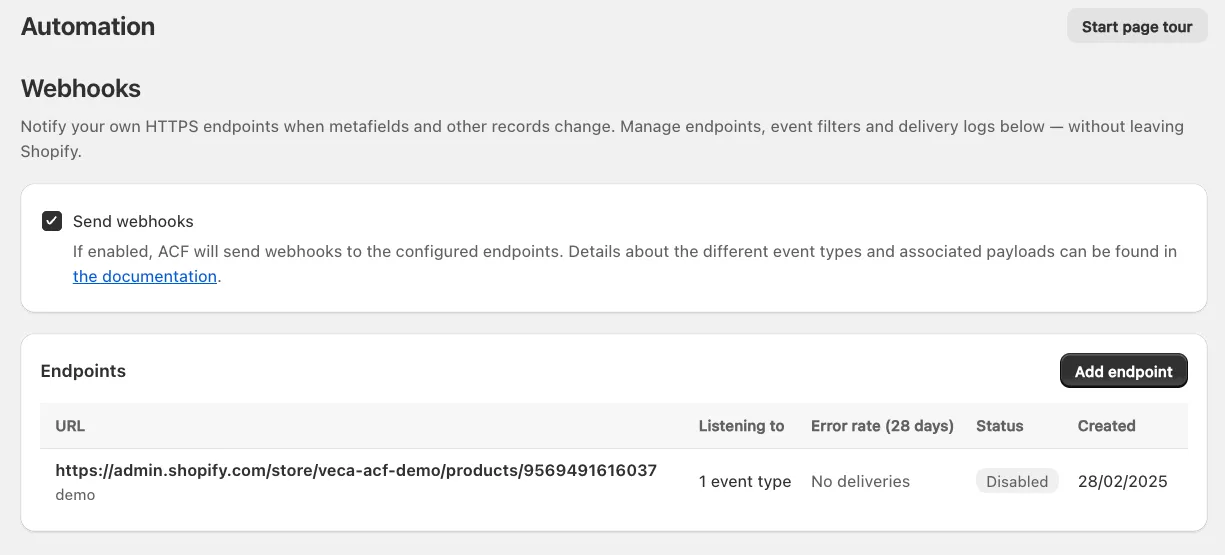
Tick Send webhooks to let ACF deliver events to the configured endpoints. With the switch off, endpoints stay configured but nothing is delivered.
The Endpoints card lists everything you have set up, with the endpoint’s URL and description, what it is Listening to, its Error rate (28 days), its Status and when it was Created.
Adding an endpoint
Section titled “Adding an endpoint”Click Add endpoint to open the endpoint form:
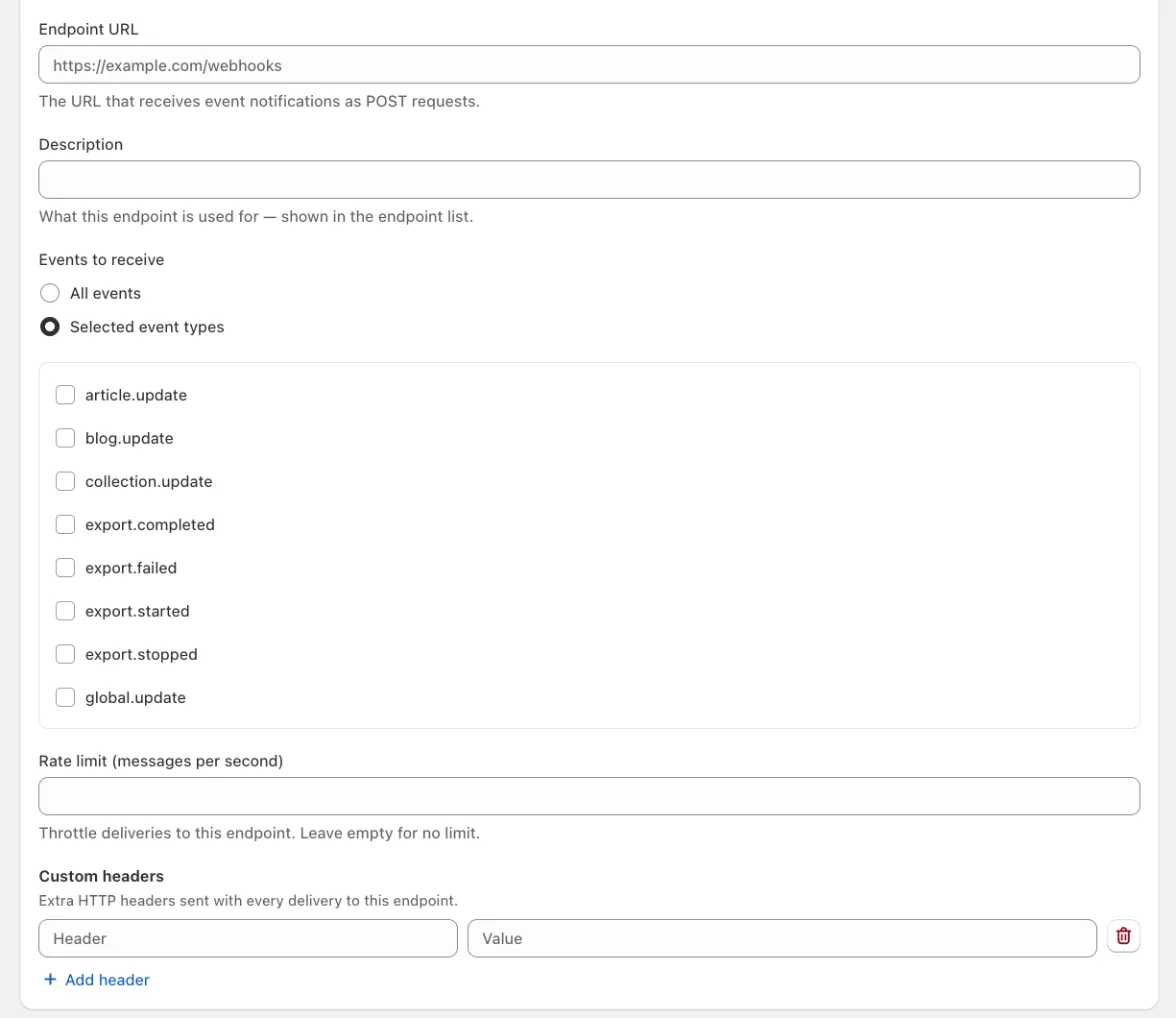
- Endpoint URL: the URL that receives the event notifications as POST requests.
- Description: what this endpoint is used for. It is shown underneath the URL in the endpoint list, so give it something you’ll recognise later.
- Events to receive: choose All events to have a single endpoint receive everything, or Selected event types to tick only the events this endpoint cares about.
- Rate limit (messages per second): throttles deliveries to this endpoint. Leave it empty for no limit.
- Custom headers: extra HTTP headers sent with every delivery to this endpoint, entered as header/value pairs. Use Add header for each additional one.
Managing an endpoint
Section titled “Managing an endpoint”Clicking an endpoint in the list opens its own page. The same settings are editable there, and the buttons in the top right let you Enable endpoint (or disable it again), Replay failed deliveries and Delete endpoint. A disabled endpoint keeps its configuration but shows a banner reminding you that it is not receiving events.

Further down the page you’ll find the endpoint’s signing secret and its delivery history:
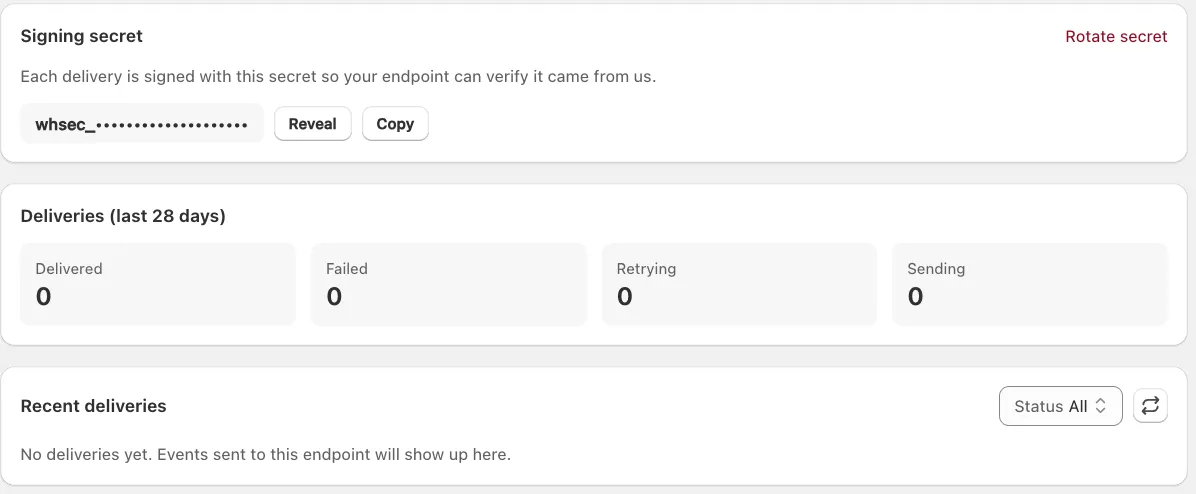
- Signing secret: every delivery is signed with this secret, so your endpoint can verify that the request really came from ACF. Use Reveal and Copy to get the value into your own application, and Rotate secret if it was ever exposed.
- Deliveries (last 28 days): a quick count of how many messages were Delivered, Failed, are Retrying or are currently Sending.
- Recent deliveries: the individual delivery attempts for this endpoint, filterable by status. Until the endpoint has received anything it simply reads “No deliveries yet.”
Responding to webhooks
Section titled “Responding to webhooks”After receiving a webhook using an HTTPS endpoint, it’s important to respond to the request with a 200 OK as quickly as possible.
A common pattern is to store the payload in a message queue for later processing by a background worker. This reduces the chance of the request timing out, and the webhook delivery counting as a failure.
This is normally not something you need to consider when using an automation platform that handles the technical stuff for you.
Delivery schedule
Section titled “Delivery schedule”ACF attempts to deliver each webhook message based on a retry schedule with exponential backoff. Each message is attempted based on this schedule:
- Immediately
- 5 seconds
- 5 minutes
- 30 minutes
- 2 hours
- 5 hours
- 10 hours
- 20 hours
After the above attempts the message will be marked as failed. If an endpoint is removed or disabled, delivery attempts to the endpoint will be disabled as well.
Resend webhooks
Section titled “Resend webhooks”If for some reason your endpoints are unavailable for an extended period of time (more than 20 hours), or the automatic delivery schedule doesn’t fit your needs, open the endpoint and click Replay failed deliveries to send the failed messages again.